
API Management
Who Can Request an APIM Subscription Key?
Eligible requestors:
- Any designated client contact who can sign up at our developer portal (does not have to be a Rev.io “System Administrator” in the app).
High-level process
- Go to our developer portal and sign up / verify email.
- Navigate to Products → Rev.io API.
- Create a subscription using the naming pattern
CLIENT NAME-KEY(for example,Altaworx-KEY). - Rev.io approves the subscription (typically within ~48 hours if it matches the expected format and no other keys exist for that client).
- Once approved, the user can view the Primary/Secondary subscription keys under Profile → Show key.
Policy
- Only one APIM subscription key per client tenant; additional vendors share this key rather than requesting separate keys.
How APIM Keys Are Created and Used
Creation & ownership
Created and managed in Azure API Management (APIM) behind the Rev.io developer portal; the prod-psarevio-apim resource enforces rate limits and quotas.
The client's APIM subscription is tied to a product like Rev.io API and yields the subscription key (Ocp-Apim-Subscription-Key).
Who the key is “for”
The APIM key is for the client tenant, not for an individual user or vendor.
Third-party vendors (FORT, Quoter, Odin, etc.) use the client’s APIM key when integrating.
3rd-party integration pattern
Client shares their APIM key with the vendor (stored securely on the vendor side).
Vendor combines:
Ocp-Apim-Subscription-Key: {customer APIM key}- Basic Auth with dedicated API user credentials (
username@clientcodeand password)
What Clients Can Do Themselves: API Users & Permissions
Client-controlled items (inside Rev.io/PSA)
- Create API-only users (for example,
FORTAPI@ALTWORX,INTEGRATIONS@CLIENTCODE) - Assign roles and permissions that govern:
- which accounts/data are visible
- which operations (
GET,POST,PUT,DELETE) are allowed
- Rotate API user passwords and disable users when decommissioning an integration
Typical recommended setup
- One APIM key per client (Rev.io-controlled, via dev portal)
- One API user per integration (client-controlled, via Rev.io/PSA admin tools)
Vendors never need interactive portal access; they only need:
- The APIM key
- The API user credentials for their integration
Flow chart visual
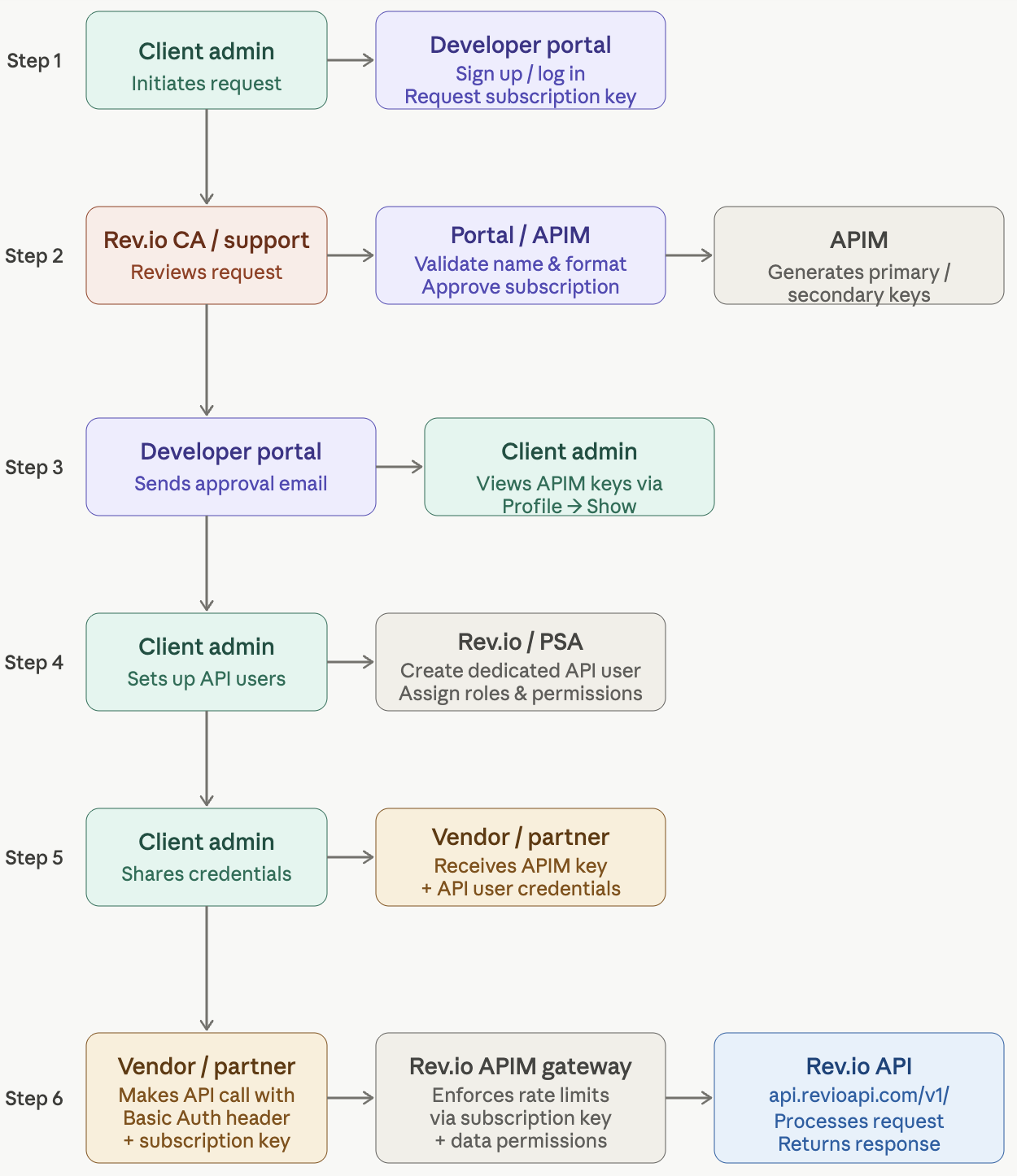
Updated 6 months ago
Did this page help you?